Note 4 of 7
BNB Mobile Payments: Paying From an Exchange App Versus a Wallet App
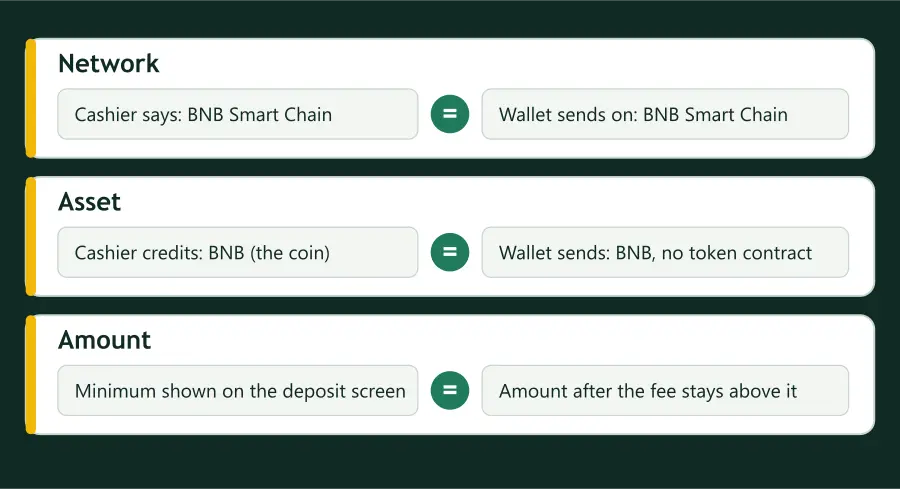
The phone page on this site is about keeping two apps in view. This note is about a different thing: the sending app is one of two kinds, and each shows the checklist’s fields in its own place.
Knowing which kind you hold saves hunting for a field that the app does not have.
An exchange app
A withdrawal screen in an exchange app asks you to choose a network from a list, shows a fee, and usually a line for the amount that will be received. The network list is the place to match the cashier’s label, and the received line is the place to check the minimum. Duelbits’ rule, matching the network you select with the one your deposit wallet supports, is a sentence written for exactly this moment, even though it speaks of the receiving side.
Exchange lists often name networks differently from casinos: BSC in one place, BEP20 in another, BNB Smart Chain in a third. Treat the three as one network, and treat anything else with a BNB in its name as a reason to stop.
A self-held wallet app
A wallet app you control shows the active network at the top of the send screen, or in a selector beside the asset. There is usually no received line; the fee is paid in BNB on top of the amount. So the check for amount becomes: do I hold enough BNB for the amount and the fee together?
Wallets also keep one network active between sessions. If you were last on another network, the send screen opens there. Read it every time.
Short answers
Is the network list in an exchange app the same as the cashier’s?
Not necessarily. The names differ between operators and apps, so match the meaning rather than the exact letters, and stop if you cannot.