Note 1 of 7
BNB Deposit Walkthrough: The Three Screens and What to Read on Each
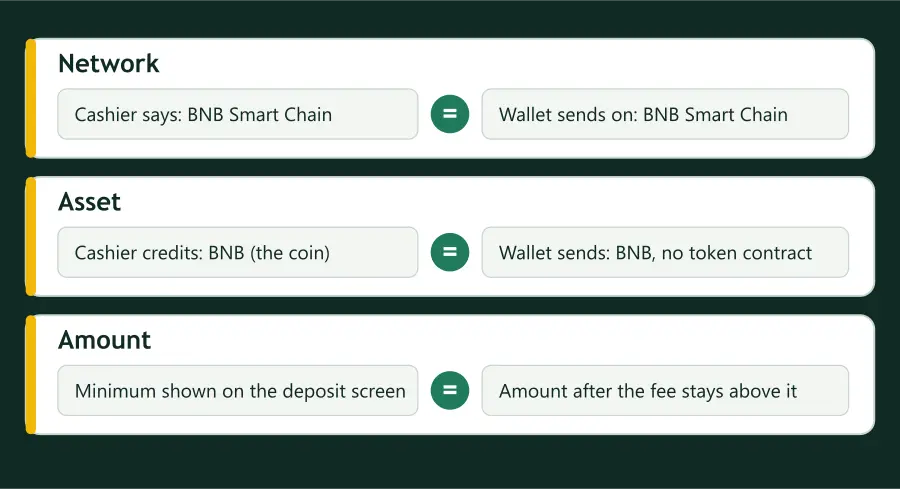
The checklist on the front page is organised by question. This note is organised by screen, because that is how a deposit is actually experienced: three screens, one after the other, and a different job on each.
The idea is that no screen is asked to do the work of another. The cashier states what is wanted, the send screen states what will be sent, and the confirmation screen is the last chance to see the two together.
Screen one: the cashier
Stake’s table says BSC (BEP20), Cloudbet’s data says BNB Smart Chain, Duelbits says Binance Smart Chain. If your cashier lets you choose among several, choose the one your wallet will use.
Cloudbet’s guide says to check it there, and says any amount below the minimum won’t be credited.
Copy it exactly if it is there, and leave it alone if it is not.
Cloudbet advises copying it from the screen each time rather than using one saved earlier.
Screen two: the send screen in the wallet
BNB itself, with no contract address and no token name beside it.
It should be the label you matched on the first screen. The coin name does not help; it says BNB on every network.
The first and last characters should be the cashier’s.
Sportsbet.io counts its minimums after network fees, so the arriving amount, not the typed one, is what meets the floor.
Screen three: the confirmation
Wallets summarise the transfer once more before it is signed: recipient, network, amount, fee. This is a read-through, not a formality. If anything here differs from what the cashier said, the transfer has not been sent yet and can still be abandoned for the price of a screen.
After sending, keep the transaction hash. Duelbits and Cloudbet both name bscscan.com as the explorer for BNB, and the hash is what you would give a support team if the deposit is slow to appear.
Short answers
Which of the three screens matters most?
The second, because it is the only one that names the network you are really sending on. The first says what is wanted and the third repeats what you chose.